Volume Booster - Sound Booster
- 4.8
- Rating
- 50.00M
- Installs
- Free
- Price

 Analysis by App-foxy
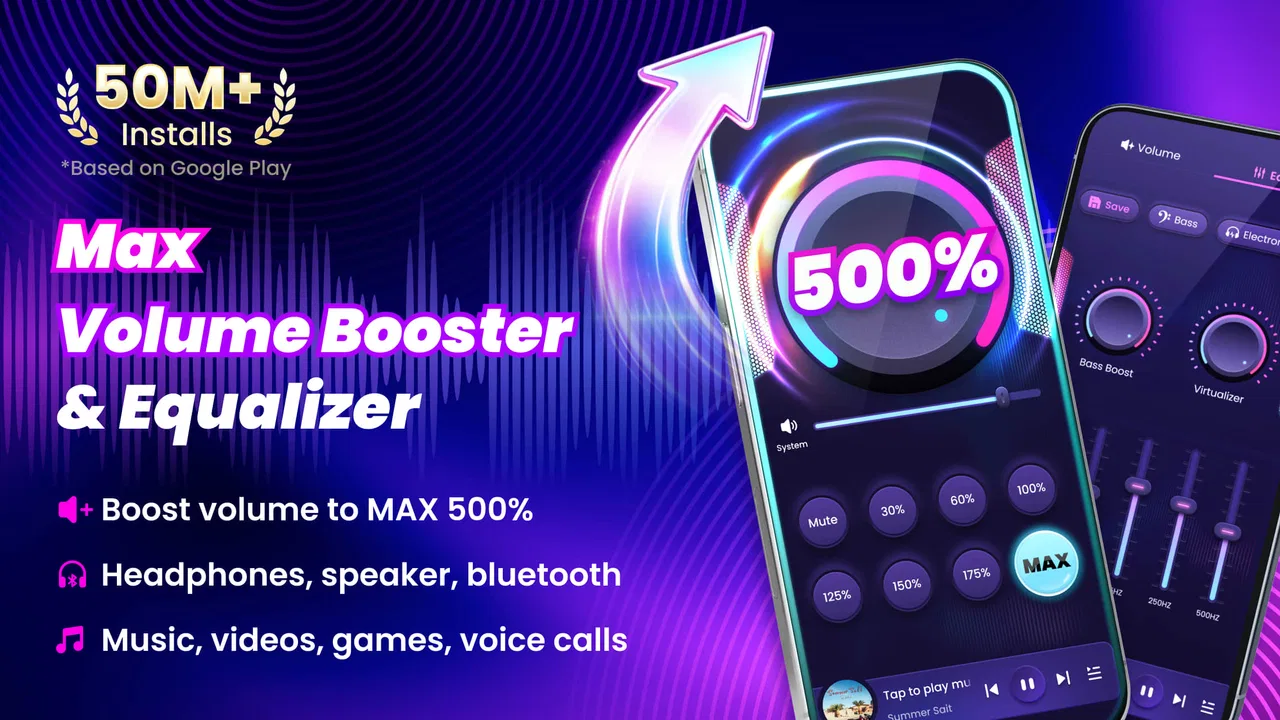
I tried Volume Booster - Sound Booster because my phone often feels too quiet when I am listening through modest headphones or watching a video in a noisy room. It is a free Android music and audio app from 360 Tool, built around one straightforward job: pushing the perceived loudness beyond the normal system level. That narrow purpose is both its appeal and its limitation. You are not getting a complete music player, an equalizer suite, or a replacement for your phone’s audio settings. You are getting an extra volume control for moments when the regular slider does not feel sufficient.
The app has clearly found an audience. It carries a 4.7 average from around 678 thousand ratings, with more than 50 million installs and roughly 24 thousand written reviews. Those figures suggest that the basic idea is easy for many people to understand and useful enough to keep around. Still, popularity does not remove the need for caution. Boosting sound can make listening more comfortable in some situations, but it can also make harsh audio, distorted speakers, or overly loud headphones more unpleasant. My experience is that this is best treated as a small utility, not something to leave running at maximum all day.
What the app is really for
The first thing I noticed is how focused the experience feels. Volume Booster - Sound Booster is aimed at increasing the output from a phone speaker or connected headphones when the ordinary Android volume range is not enough. That makes sense for quiet podcasts, older videos with low recording levels, spoken instructions, or a film watched in a room where background noise is unavoidable.
You May Also Like

 Blood Strike: 2.5 Anniversary
Blood Strike’s Loadouts Turn Every Drop Into a Tactical Gamble
A close look at Blood Strike’s custom loadouts: how fast access to signature weapons reshapes its battle royale rhythm, rewards preparation, and narrows the gap between fights.

 Pandora - Music & Podcasts
Pandora’s Music Is Easy to Start, but Harder to Recover
Pandora’s strength is its low-effort path from a seed to a station. Its weak spot is how much confidence it asks you to place in connection, setup, and quiet recovery.

 8 Ball Pool
 Is Built on Rivalries, Rematches, and Routine
A close look at the rivalries, rematches, shared routines, and unanswered safety questions that turn a quick pool match into a persistent mobile community.

 Samsung Music
’s Quiet Strength Is Playing What You Already Own
Its reach comes less from spectacle than from dependable access to a personal library. That simplicity is both the app’s strongest retention engine and its ceiling.

 AccuWeather: Weather Radar
AccuWeather Review: A Quick, Clear Forecast for Everyday Decisions
For everyday plans, the best forecast is the one you can understand quickly. AccuWeather makes rain timing, radar, and local conditions easy to act on, with a few trade-offs.

 Hill Climb Racing
Why Hill Climb Racing Still Turns Crashes Into One More Run
A tiny car, a bumpy hill and one more upgrade: Hill Climb Racing keeps resurfacing because its simple chaos makes every near-miss feel personal.
More From Our News Desk
View All News


A realistic example is listening to a podcast while preparing dinner. The phone may be on a counter several feet away, and the normal maximum is just below the level needed to follow every sentence. A modest boost can make the speech easier to catch without repeatedly walking over to the device. The same applies to a video call recording, an audiobook, or a lecture where the speaker was recorded at a low level.
It is less convincing when the original problem is poor audio quality. If a song already sounds thin, compressed, or distorted, adding volume will not restore detail. It only makes the existing sound louder. This distinction matters because the app can solve a level problem, but not a recording problem, damaged headphones, blocked speaker openings, or a weak Bluetooth connection.
Compared with the usual alternatives, this is simpler than a full equalizer and more direct than changing settings inside every individual music or video app. A system volume slider controls the normal range, while an equalizer changes the balance between bass, midrange, and treble. This utility sits beside those options by concentrating on extra loudness. If you want to shape vocals, reduce bass, or create a listening profile, a dedicated equalizer is likely the better choice. If your only complaint is that maximum volume is not quite enough, the focused approach is easier to understand.
A simple tool with a real safety trade-off
The most important practical point is that louder is not automatically better. When I use a booster, I start with a small increase and listen for changes in clarity rather than jumping straight to the strongest setting. If voices become sharp, music starts sounding rough, or the speaker rattles, I lower the level immediately. That habit is more useful than chasing the biggest possible number on a control.
Phone speakers are especially revealing here. Their small drivers can struggle with bass-heavy tracks and crowded mixes. Extra amplification may make a quiet voice more audible, but it can also expose buzzing or clipping. Headphones create a different risk: the sound may seem acceptable at first, then become uncomfortable when a sudden loud section arrives. I would not hand the phone to a child with an aggressive boost enabled, even though the app is rated for Everyone. The age rating describes suitability in the store, not a guarantee that every listening level is safe for every person.
One useful workflow is to reduce the regular Android volume first, then add only enough extra boost to recover clarity. This gives me more room to adjust instead of combining a maximum system setting with a maximum booster setting. I also switch the boost back down after finishing a video. That small step prevents the next notification, song, or call from starting unexpectedly loud.
Another overlooked issue is changing output devices. A level that feels reasonable through a phone speaker may be far too strong through headphones, and a Bluetooth speaker may have its own internal volume control. I check the output whenever I move from one device to another. The app is most helpful when I treat it as a temporary adjustment rather than a permanent loudness setting.
How it fits into everyday listening
For spoken audio, the benefit is easier to judge. Podcasts and audiobooks often have fairly consistent voices, so a small increase can improve intelligibility without making the whole experience tiring. I find the tool more useful for that kind of content than for music, where distortion is more noticeable and the desired level varies from track to track.
It can also help with older clips recorded at inconsistent levels. Instead of raising the television or disturbing people nearby, I can increase the phone output for that one clip and return to normal afterward. This is a practical advantage over relying solely on the system slider, especially when the slider has already reached its upper limit.
For music, expectations should be more modest. A quiet track may become easier to hear, but the app cannot create missing dynamics or improve the mix. If the goal is better sound rather than more sound, I would choose a player with proper equalizer controls, a better pair of headphones, or a higher-quality source before depending on a booster.
Gaming is another mixed case. Extra loudness can make dialogue and effects easier to notice, but games often contain sudden peaks. I would test the setting in a quiet menu or low-intensity scene first, then keep the level conservative. Players who need precise directional audio may actually prefer a balanced output over maximum volume, because excessive loudness can make every effect compete for attention.
Trust, controls, and what I can judge from the app
Trust is difficult to assess from a volume utility alone, so I pay attention to what the app visibly lets me control rather than assuming anything about its internal behavior. The developer is listed as 360 Tool, and the app is free to install. Optional in-app purchases are listed from $2.99 to $11.99 per item. That means I would review any purchase screen carefully before confirming, especially if I am only looking for a quick temporary boost.
The app does not need a complicated explanation to make its purpose clear. Its public identity is a volume booster for speakers and headphones, and that narrow scope is reassuring in one sense: I am not expecting account management, social posting, or a large content library. At the same time, a narrow purpose makes visible controls especially important. I want to know when the boost is active, how to reduce it quickly, and how to return to ordinary sound without hunting through several menus.
When I test an app like this, I avoid granting access that does not clearly relate to audio control. I also check Android’s permission screen and the app’s current privacy information before regular use. Those are not glamorous steps, but they are the right way to handle any utility installed on a personal phone. I would not infer strong privacy practices merely from a simple interface, nor would I assume that a small app has no data considerations. The sensible approach is to inspect the choices Android presents and keep only the access that matches the app’s purpose.
Data-sensitive moments deserve extra attention when an app is used around headphones, calls, or other personal audio. I would avoid experimenting with a booster during a private call or while switching between unknown Bluetooth devices. First I test it with a local video or a familiar song, then I confirm that the output is going to the device I expect. This is less about the booster itself and more about preventing an accidental loud or misplaced playback event.
Where the experience can become frustrating
The biggest limitation is that results depend heavily on the phone, the audio source, and the output hardware. One device may respond clearly to a boost, while another may become harsh almost immediately. Headphones also vary widely. Some already have plenty of output, so adding more only reduces comfortable adjustment space. If your phone is quiet because of a hardware fault or a blocked speaker grille, software amplification is not a proper repair.
There is also a practical question of persistence. A booster is useful only if I can tell whether it is active. If I forget that I raised the level, the next piece of audio may be louder than expected. I therefore prefer using it for a specific task and then returning to a safer baseline. Anyone who wants a set-and-forget audio profile may find a system-integrated sound tool more convenient.
Another trade-off is that a dedicated equalizer may offer better control for people who understand what they want to change. For example, reducing muddy low frequencies can make speech clearer without increasing overall loudness. Volume Booster - Sound Booster is not the right answer to that problem. It is also not a substitute for hearing assistance equipment, professional monitoring tools, or carefully calibrated audio hardware.
The free price makes trying it low-risk from a budgeting perspective, but the optional purchases still deserve attention. I would not pay simply because a louder setting feels impressive for a few seconds. I would first establish whether the free experience solves my recurring problem, then decide whether any optional item offers a meaningful benefit. A utility this focused should earn its place through regular usefulness, not novelty.
Who should install it, and who should skip it
I would recommend it to someone who regularly watches quiet videos, listens to spoken content on a phone with limited output, or needs a quick extra level without learning a full audio editor. It is also a reasonable experiment for people using older Android hardware, provided they test carefully and keep the boost moderate. The app supports Android 6.0 and later, so it covers a broad range of devices still in use.
I would be more cautious recommending it to anyone who already finds headphones loud enough, has sensitive hearing, or expects studio-quality sound. People who want bass and treble adjustment, automatic profiles, or detailed audio analysis should look toward a proper equalizer or the sound controls built into their device. Likewise, if the phone speaker is physically damaged, buying new hardware or repairing the device is more sensible than amplifying the defect.
Parents should pay attention to the combination of the Everyone rating and the actual listening situation. The rating makes the app broadly accessible, but it does not replace supervision of volume. I would set a comfortable level, explain that the booster is not a reason to keep increasing sound, and check the output when headphones are connected.
Version 2.7.1.56 is the current version, and the app was released on February 6, 2023. Those details matter mainly when troubleshooting: I would check that the installed build is current before blaming the utility for behavior that might have changed between releases. I would also remember that Android audio behavior can differ between manufacturers, so a result on one handset is not a promise about another.
My cautious verdict after using it
Volume Booster - Sound Booster is worthwhile when the problem is simply “the maximum is not quite loud enough.” It gives that situation a direct answer and avoids the complexity of a full music production tool. I like the fact that its purpose is easy to understand, and the large user base suggests that the basic use case resonates with many Android owners.
My recommendation comes with a firm condition: use the smallest boost that makes the audio clear, then reduce it when the listening session ends. The app can improve a quiet podcast or an under-recorded video, but it cannot repair poor sound quality, replace good headphones, or make unsafe listening habits sensible. I would also inspect Android’s permissions and visible privacy choices before settling into regular use, rather than treating any simple utility as automatically trustworthy.
For me, this is a useful occasional tool rather than an essential everyday companion. Its free entry point makes it easy to test, while the optional purchases mean I would keep an eye on the purchase screen and judge any upgrade by repeated need. If your phone’s normal output is adequate, skip it. If you often miss speech because the standard level falls just short, this focused Android audio app is a practical option—as long as you keep control of the volume instead of letting the volume control take control of you.
FAQs for Volume Booster - Sound Booster
01What is Volume Booster - Sound Booster and how does it work?
Volume Booster - Sound Booster is an application designed to enhance the audio output of your device. It works by amplifying the sound from media, notifications, and calls beyond the usual limits. The app utilizes advanced algorithms to increase volume levels while maintaining audio clarity, making it ideal for users who find their device's default sound inadequate.
02Is Volume Booster - Sound Booster safe for my device?
While Volume Booster - Sound Booster is generally safe to use, it is essential to be cautious with the volume levels. Excessive amplification can potentially damage the speakers or your hearing. The app includes built-in safeguards and recommends optimal settings to prevent such issues, but users should still monitor their usage closely.
03Does Volume Booster - Sound Booster require rooting or jailbreaking my device?
No, Volume Booster - Sound Booster does not require rooting or jailbreaking. It is designed to work seamlessly on both Android and iOS devices without needing any modifications to the operating system. This makes it accessible to all users while maintaining the integrity of the device's system.
04Can Volume Booster - Sound Booster improve audio quality for all types of media?
Yes, Volume Booster - Sound Booster can enhance the audio quality for various types of media, including music, videos, and games. The app optimizes sound output for each media type, ensuring a balanced and rich audio experience. However, the effectiveness may vary depending on the device's hardware capabilities.
05Is there a cost associated with using Volume Booster - Sound Booster?
Volume Booster - Sound Booster offers a free version with basic features, but there is also a premium version available. The premium version includes advanced features, such as customizable presets and an ad-free experience. Users can choose to upgrade for a one-time fee or a subscription, depending on the available options.
Pros
- Enhances audio clarity significantly.
- User-friendly interface
- easy to navigate.
- Wide range of adjustable sound settings.
- Compatible with most Android devices.
- Works well with headphones and speakers.
Cons
- May distort sound at maximum boost.
- Ads can be intrusive during use.
- Limited features in the free version.
- Some users report occasional crashes.
- Not available on iOS platforms.

Volume Booster - Sound Booster
Gallery